-
Shop
- Adidas
- Advanced Technologies
- Apple Accessories
- Armani
- Arts, Crafts & Hobbies
- Astrology & Tarot Products
- Bathroom
- Best-Sellers
- Black Friday Sale
- Calvin Klein
- Car Accessories
- Christmas Collection
- Dating & Social Skills
- Denim
- 7FOR
- AGOLDE
- Antony Morato
- Armani Exchange
- Boss
- Brunello Cucinelli
- Calvin Klein Jeans
- Costume National
- Desigual
- Diesel
- Dolce & Gabbana
- Dsquared²
- Ermanno Scervino
- Fendi
- Gianni Lupo
- Guess Jeans
- Ichi
- Just Cavalli
- Lee
- Levi's
- Liu Jo
- Morgan De Toi
- Mother Denim
- Only
- Pepe Jeans
- Pinko
- Replay
- Tommy Hilfiger Jeans
- Valentino
- Vero Moda
- Digital Resources
- Easter Products
- Education & Learning
- Fall 2025 Fashion Best-Sellers
- Family & Parenting
- Fashion
- Accessories
- Alexander McQueen
- Bags
- Bags & Wallets
- Balenciaga
- Belts
- Blazers
- Blouses & Shirts
- Bottega Veneta
- Bottoms
- Brunello Cucinelli
- Burberry
- Chanel
- Chloé
- Dior
- Dolce & Gabbana
- Dresses
- Etro
- Fendi
- Gucci
- Hats & Hair Accessories
- Hoodies & Sweatshirts
- Jacquemus
- Jewelry
- Jil Sander
- Jimmy Choo
- Kiton
- Laptop Sleeves
- Luggage
- Luggage Bags
- Men's Fashion
- Miu Miu
- Off-White
- Outerwear
- Passport Covers
- Phone Cases
- Prada
- Rick Owens
- Saint Laurent
- Scarves
- Shoes
- Skirts
- Socks
- Socks & Tights
- Sunglasses
- Sweaters & Cardigans
- The Row
- Tom Ford
- Tops & Shirts
- Trousers
- Tumblers
- Valentino
- Valentino Garavani
- Versace
- Vivienne Westwood
- Watches
- Fashion Accessories
- Father's Day
- Fitness & Yoga Guides
- Furniture
- Gadgets
- Gift Guide Collection
- Health & Beauty
- Health & Wellness
- Home & Garden
- Home Electronics
- Home Supplies
- Independence Day
- Kids & Babies
- Kitchen
- Kitchen Best-Sellers
- Lighting
- Luxury Brands Collection
- Mother’s Day
- Nike
- Patio, Lawn & Garden
- Personal Growth
- Pet Care
- Pets
- Pinterest Best-Sellers
- Samsung Accessories
- Sport & Outdoors
- Summer 2025 Fashion Collection
- Super Deals
- TikTok Growth & Monetization Mastery
- Tommy Hilfiger
- Travel
- Travel & Outdoors
- Wealth
- Wealth Building
- Budgeting & Saving
- Cryptocurrency Investing
- Debt Management
- Entrepreneurship & Business Growth
- Family Finance & Budgeting
- Financial Independence
- Financial Mindset & Psychology
- Financial Planning
- Frugal Living & Expense Hacks
- Goal Setting
- High-Income Skills
- Investing Basics
- Leadership
- Motivation
- Networking & Mentorship
- Passive Income Strategies
- Real Estate Investing
- Side Hustles
- Stock Market Investing
- YouTube Shorts Best-Sellers
- Popular
- Best deals
Bluetooth Selfie Stick Tripod: Photo Tips for Every Angle
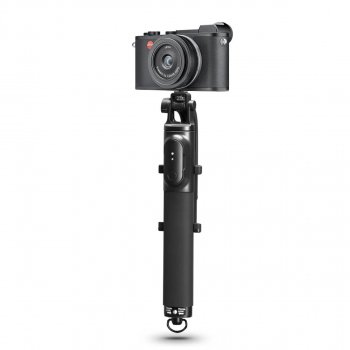
Some moments are too good to leave anyone out of the frame—including you. Whether you’re taking a quick solo selfie or gathering friends for a group photo, the right setup can give you more room to compose the shot. Our Bluetooth Selfie Stick Tripod with Remote and 360° Phone Rotation brings handheld and hands-free options together, so you can choose what works for the moment. For more guidance, see Best selfie sticks in 2026: for your smartphone, GoPro, or full-size ….
With a little attention to placement and framing, you can spend less time reaching for your phone and more time enjoying the occasion. Here’s how our team recommends making the most of its different functions.
One Tool for More Ways to Capture
A handheld selfie stick gives you flexibility when you want to move around and find a pleasing background. You can hold the phone farther away than you might by hand, then adjust your position until the scene feels right. It’s a practical option for a solo photo, a quick picture with a friend, or a moment when you don’t have a suitable surface nearby.
Switch to the tripod setup when you want a hands-free photo. Set your phone in position, step into the frame, and use the Bluetooth remote to trigger the shot without reaching for the screen. That makes it easier to include everyone in a group picture or take an everyday photo without asking someone else to hold the phone.
Our Bluetooth Selfie Stick Tripod with Remote and 360° Phone Rotation combines those options in one tool, giving you a straightforward way to adapt your setup as your plans change.
Find Your Angle with 360° Phone Rotation
The phone rotation feature helps you adjust the composition to suit the subject. For a solo portrait, you might angle the phone to keep yourself centered while including a little of the setting. For a group, a wider-looking composition can leave space around the people at either end. If the surroundings are part of the story, adjust the angle until they’re visible without crowding the main subject.
Try both portrait and landscape framing when your phone and the holder allow it. Portrait orientation can work well for an individual or a full-length outfit photo, while landscape orientation gives a group or a broad background more room across the frame. Secure your phone in the holder before adjusting its angle, and check that it remains secure afterward.
Take a moment to look at the edges of the screen, too. A small change in angle can keep a person’s head from being cut off or remove an unwanted distraction from the background.
Choose a Setup for the Moment
There’s no need to use the same approach for every photo. Choose handheld mode when you want to make quick adjustments, or use the tripod when you want both hands free. This table offers a starting point:
| Moment | Setup | Framing tip |
|---|---|---|
| Solo selfie | Handheld selfie stick | Adjust the phone angle to include the desired background. |
| Group photo | Tripod with remote | Leave enough space around the group before triggering the shot. |
| Everyday hands-free photo | Tripod | Set it on a stable surface and check the composition. |
For a tripod shot, choose a stable surface and check the frame before you step away. Leave a little extra space around your subject so there’s room for small shifts in position. If you’re photographing a group, let everyone settle into place before using the remote.
A hands-free setup can also be useful when you want to capture an outfit from a little farther back. For example, if you’re getting ready for an occasion in our Crystal Slingback High Heels, a full-length composition gives you room to include your complete look. Position the tripod securely and check that the entire outfit is in the frame before taking the photo.
Get Ready to Take the Shot
A simple routine can help you move from setup to photo without missing the moment:
- Secure your phone. Place it in the holder and make sure it is held securely.
- Choose your setup. Use the selfie stick handheld, or set up the tripod on a stable surface for a hands-free photo.
- Adjust the angle. Rotate the phone as needed and look at the screen to check your composition.
- Use the remote. Follow your phone and remote instructions for Bluetooth pairing, then trigger the photo when you’re ready.
Before stepping away, check both the tripod’s stability and the phone’s grip in the holder. If the first photo isn’t quite right, adjust your position or angle and try again. For an overview of the wireless technology, you can visit Bluetooth’s introduction to Bluetooth.
A Handy Addition to Your Photo Routine
Combining a selfie stick, tripod, Bluetooth remote, and rotating phone holder gives you choices without making your photo routine complicated. Use the handheld setup for a quick selfie, or make room for the whole group with a stable tripod and the remote.
Ready to find your next angle? View the Bluetooth Selfie Stick Tripod with Remote and 360° Phone Rotation at Velori. It’s in stock for $29.82.
FAQ
What is the Bluetooth remote for?
The remote lets you trigger a photo without reaching for your phone. Follow your phone and remote instructions to pair them using Bluetooth.
Can I use the selfie stick as a tripod?
Yes. It combines selfie stick and tripod functions, so you can set it on a stable surface for hands-free photos.
How does the 360° phone rotation help with photos?
It lets you adjust the phone angle for different compositions, whether you’re framing a person, a group, or the surroundings. Secure the phone in the holder before adjusting it.
Recommended for you


Women’s Backless High Support Yoga Tank: Fit Guide
Nov 21, 2026




Leave a comment