-
Shop
- Adidas
- Advanced Technologies
- Apple Accessories
- Armani
- Arts, Crafts & Hobbies
- Astrology & Tarot Products
- Bathroom
- Best-Sellers
- Black Friday Sale
- Calvin Klein
- Car Accessories
- Christmas Collection
- Dating & Social Skills
- Denim
- 7FOR
- AGOLDE
- Antony Morato
- Armani Exchange
- Boss
- Brunello Cucinelli
- Calvin Klein Jeans
- Costume National
- Desigual
- Diesel
- Dolce & Gabbana
- Dsquared²
- Ermanno Scervino
- Fendi
- Gianni Lupo
- Guess Jeans
- Ichi
- Just Cavalli
- Lee
- Levi's
- Liu Jo
- Morgan De Toi
- Mother Denim
- Only
- Pepe Jeans
- Pinko
- Replay
- Tommy Hilfiger Jeans
- Valentino
- Vero Moda
- Digital Resources
- Easter Products
- Education & Learning
- Fall 2025 Fashion Best-Sellers
- Family & Parenting
- Fashion
- Accessories
- Alexander McQueen
- Bags
- Bags & Wallets
- Balenciaga
- Belts
- Blazers
- Blouses & Shirts
- Bottega Veneta
- Bottoms
- Brunello Cucinelli
- Burberry
- Chanel
- Chloé
- Dior
- Dolce & Gabbana
- Dresses
- Etro
- Fendi
- Gucci
- Hats & Hair Accessories
- Hoodies & Sweatshirts
- Jacquemus
- Jewelry
- Jil Sander
- Jimmy Choo
- Kiton
- Laptop Sleeves
- Luggage
- Luggage Bags
- Men's Fashion
- Miu Miu
- Off-White
- Outerwear
- Passport Covers
- Phone Cases
- Prada
- Rick Owens
- Saint Laurent
- Scarves
- Shoes
- Skirts
- Socks
- Socks & Tights
- Sunglasses
- Sweaters & Cardigans
- The Row
- Tom Ford
- Tops & Shirts
- Trousers
- Tumblers
- Valentino
- Valentino Garavani
- Versace
- Vivienne Westwood
- Watches
- Fashion Accessories
- Father's Day
- Fitness & Yoga Guides
- Furniture
- Gadgets
- Gift Guide Collection
- Health & Beauty
- Health & Wellness
- Home & Garden
- Home Electronics
- Home Supplies
- Independence Day
- Kids & Babies
- Kitchen
- Kitchen Best-Sellers
- Lighting
- Luxury Brands Collection
- Mother’s Day
- Nike
- Patio, Lawn & Garden
- Personal Growth
- Pet Care
- Pets
- Pinterest Best-Sellers
- Samsung Accessories
- Sport & Outdoors
- Summer 2025 Fashion Collection
- Super Deals
- TikTok Growth & Monetization Mastery
- Tommy Hilfiger
- Travel
- Travel & Outdoors
- Wealth
- Wealth Building
- Budgeting & Saving
- Cryptocurrency Investing
- Debt Management
- Entrepreneurship & Business Growth
- Family Finance & Budgeting
- Financial Independence
- Financial Mindset & Psychology
- Financial Planning
- Frugal Living & Expense Hacks
- Goal Setting
- High-Income Skills
- Investing Basics
- Leadership
- Motivation
- Networking & Mentorship
- Passive Income Strategies
- Real Estate Investing
- Side Hustles
- Stock Market Investing
- YouTube Shorts Best-Sellers
- Popular
- Best deals
1080P Solar WiFi Outdoor Security Camera Guide
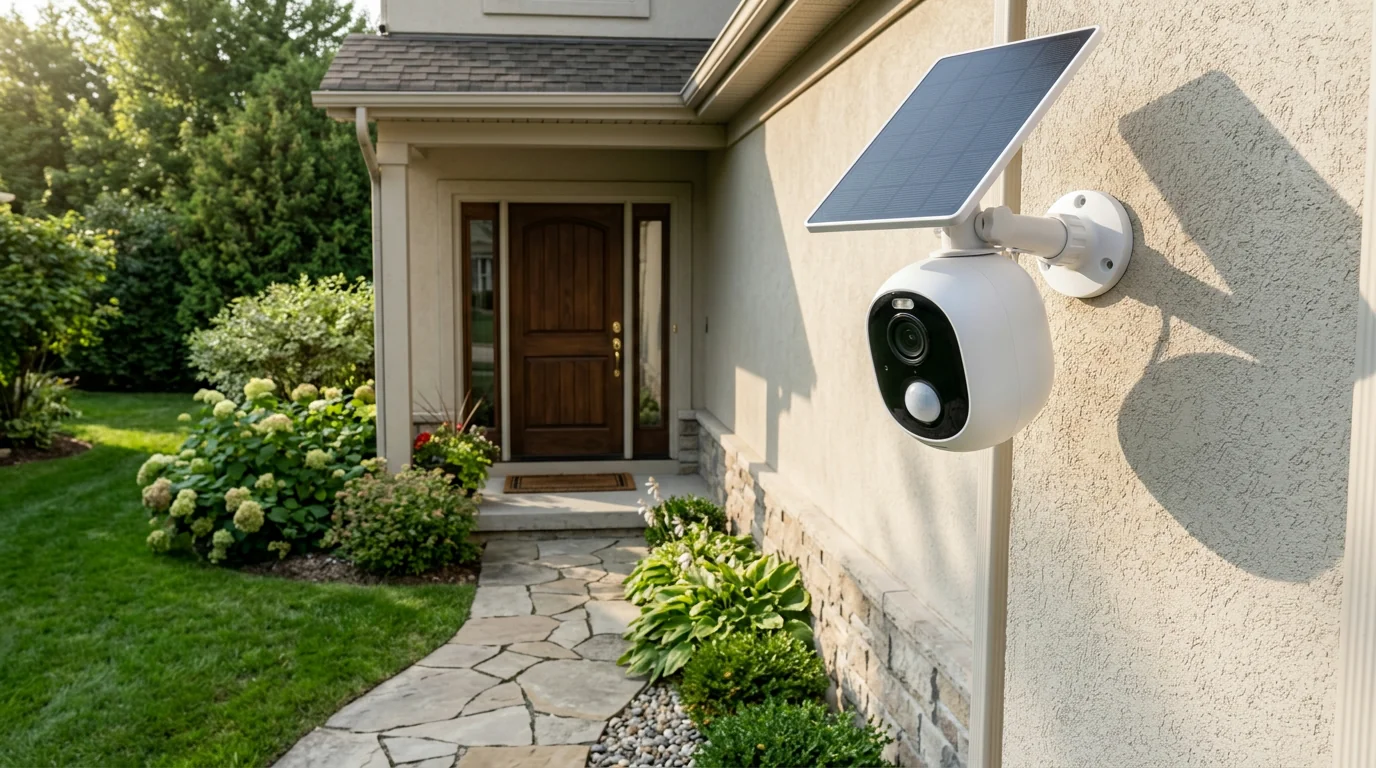
Keeping an eye on an outdoor area starts with a useful view and a setup that suits your space. Our 1080P Solar WiFi Outdoor Security Camera combines a detailed 1080P view with solar power, WiFi connectivity, night vision, and PIR motion alerts. It is a practical option to consider for an entrance, yard, or another area you want to monitor.
Choosing a position matters as much as choosing features. Sunlight, wireless signal strength, nearby obstacles, and privacy all deserve attention before you install a camera. Here is how the main features can fit into your everyday plans.
A camera for day and night
The camera’s 1080P resolution provides a detailed view of the area in front of it. That can help you see what is happening around a doorway or across a section of your yard. The usefulness of the picture will also depend on where you position the camera and whether objects obstruct its view.
Night vision supports viewing after dark, giving you another way to keep an eye on the same area when daylight is no longer available. Rather than aiming for the widest possible scene, start with the spot that matters most to you, such as the approach to your front door or a side entrance.
Keep your neighbors’ privacy in mind when choosing the angle. Aim the camera toward your own property, and avoid including neighboring windows or private spaces when you can. You may also want to review any local rules that apply to outdoor cameras.
What the main features offer
Each feature addresses a different part of an outdoor setup. Use this quick guide to match them with your needs, then consider how the conditions at your home might affect performance.
| Feature | Practical benefit |
|---|---|
| 1080P resolution | A detailed view of the monitored area |
| Solar power | Uses sunlight as a power source |
| WiFi connectivity | Connects the camera to a wireless network |
| Night vision | Supports viewing after dark |
| PIR motion alert | Provides alerts associated with detected motion |
Solar power makes access to sunlight an important part of your placement decision; it does not guarantee uninterrupted power in every condition. WiFi connects the camera to your wireless network, but the connection can be affected by signal strength and network availability. Likewise, motion alerts are helpful cues rather than a promise that every movement will be detected.
Because the camera uses your wireless network, we also recommend paying attention to network security. The Federal Trade Commission’s guide to securing your home Wi-Fi network offers practical steps, including using strong passwords and keeping router software current.
Finding the right outdoor position
Begin by deciding what you want to see. An entrance may be your priority if you want a view of the path to your door, while a yard-facing position may be more useful for another part of your property. Choose a view that covers the area of interest without including more of your neighbors’ spaces than necessary.
Next, look at sunlight and WiFi together. A sunny location may be appealing for solar power, but it also needs a reliable wireless signal. Walls and distance can affect that signal, so consider the camera’s location in relation to your router before settling on a mounting spot. Sunlight can vary with the time of day, season, and surrounding shade.
Finally, look for branches, walls, or other obstacles that could block the view. Follow the product’s installation instructions, and review the camera’s view after it is in place. Small adjustments to the angle may make the area you care about easier to see.
Getting useful motion alerts
PIR sensing responds to changes in infrared energy associated with movement. When the camera detects an appropriate change, it can provide a motion alert. These alerts can help draw your attention to activity in the monitored area, but detection is affected by positioning and environmental conditions.
After installation, check the camera’s view and its alert settings, where available. Make sure the area where you expect movement is visible and not hidden behind an obstacle. If alerts do not seem useful, revisit the camera’s position and any available settings rather than assuming that the first angle is the best one.
It is also sensible to observe how the setup performs at different times. Changes in light, weather, or the surrounding environment may influence what the camera can see or detect. A clear view and a suitable position give you a practical starting point, without guaranteeing an alert for every event.
Explore the camera
Visit our 1080P Solar WiFi Outdoor Security Camera with Night Vision and PIR Motion Alert product page to explore the camera. It is currently listed at $57.51 and in stock; price and availability may change.
If your outdoor plans also take you away from home, you can explore our Ultimate Winter Camping Quilt as a separate camping option. Our team offers both products for different outdoor needs.
FAQ
Does this camera work at night?
Yes. The camera has night vision to support viewing after dark.
What is a PIR motion alert?
PIR sensing detects changes in infrared energy associated with movement, which can trigger a motion alert.
Where should a solar WiFi outdoor camera be placed?
Choose a location with sunlight, a useful view, and a reliable WiFi signal. Follow the installation instructions and respect your neighbors’ privacy.









Leave a comment