-
Shop
- Adidas
- Advanced Technologies
- Apple Accessories
- Armani
- Arts, Crafts & Hobbies
- Astrology & Tarot Products
- Bathroom
- Best-Sellers
- Black Friday Sale
- Calvin Klein
- Car Accessories
- Christmas Collection
- Dating & Social Skills
- Denim
- 7FOR
- AGOLDE
- Antony Morato
- Armani Exchange
- Boss
- Brunello Cucinelli
- Calvin Klein Jeans
- Costume National
- Desigual
- Diesel
- Dolce & Gabbana
- Dsquared²
- Ermanno Scervino
- Fendi
- Gianni Lupo
- Guess Jeans
- Ichi
- Just Cavalli
- Lee
- Levi's
- Liu Jo
- Morgan De Toi
- Mother Denim
- Only
- Pepe Jeans
- Pinko
- Replay
- Tommy Hilfiger Jeans
- Valentino
- Vero Moda
- Digital Resources
- Easter Products
- Education & Learning
- Fall 2025 Fashion Best-Sellers
- Family & Parenting
- Fashion
- Accessories
- Alexander McQueen
- Bags
- Bags & Wallets
- Balenciaga
- Belts
- Blazers
- Blouses & Shirts
- Bottega Veneta
- Bottoms
- Brunello Cucinelli
- Burberry
- Chanel
- Chloé
- Dior
- Dolce & Gabbana
- Dresses
- Etro
- Fendi
- Gucci
- Hats & Hair Accessories
- Hoodies & Sweatshirts
- Jacquemus
- Jewelry
- Jil Sander
- Jimmy Choo
- Kiton
- Laptop Sleeves
- Luggage
- Luggage Bags
- Men's Fashion
- Miu Miu
- Off-White
- Outerwear
- Passport Covers
- Phone Cases
- Prada
- Rick Owens
- Saint Laurent
- Scarves
- Shoes
- Skirts
- Socks
- Socks & Tights
- Sunglasses
- Sweaters & Cardigans
- The Row
- Tom Ford
- Tops & Shirts
- Trousers
- Tumblers
- Valentino
- Valentino Garavani
- Versace
- Vivienne Westwood
- Watches
- Fashion Accessories
- Father's Day
- Fitness & Yoga Guides
- Furniture
- Gadgets
- Gift Guide Collection
- Health & Beauty
- Health & Wellness
- Home & Garden
- Home Electronics
- Home Supplies
- Independence Day
- Kids & Babies
- Kitchen
- Kitchen Best-Sellers
- Lighting
- Luxury Brands Collection
- Mother’s Day
- Nike
- Patio, Lawn & Garden
- Personal Growth
- Pet Care
- Pets
- Pinterest Best-Sellers
- Samsung Accessories
- Sport & Outdoors
- Summer 2025 Fashion Collection
- Super Deals
- TikTok Growth & Monetization Mastery
- Tommy Hilfiger
- Travel
- Travel & Outdoors
- Wealth
- Wealth Building
- Budgeting & Saving
- Cryptocurrency Investing
- Debt Management
- Entrepreneurship & Business Growth
- Family Finance & Budgeting
- Financial Independence
- Financial Mindset & Psychology
- Financial Planning
- Frugal Living & Expense Hacks
- Goal Setting
- High-Income Skills
- Investing Basics
- Leadership
- Motivation
- Networking & Mentorship
- Passive Income Strategies
- Real Estate Investing
- Side Hustles
- Stock Market Investing
- YouTube Shorts Best-Sellers
- Popular
- Best deals
iPad Pro, Air & Mini Sleeve: How to Choose the Right Fit
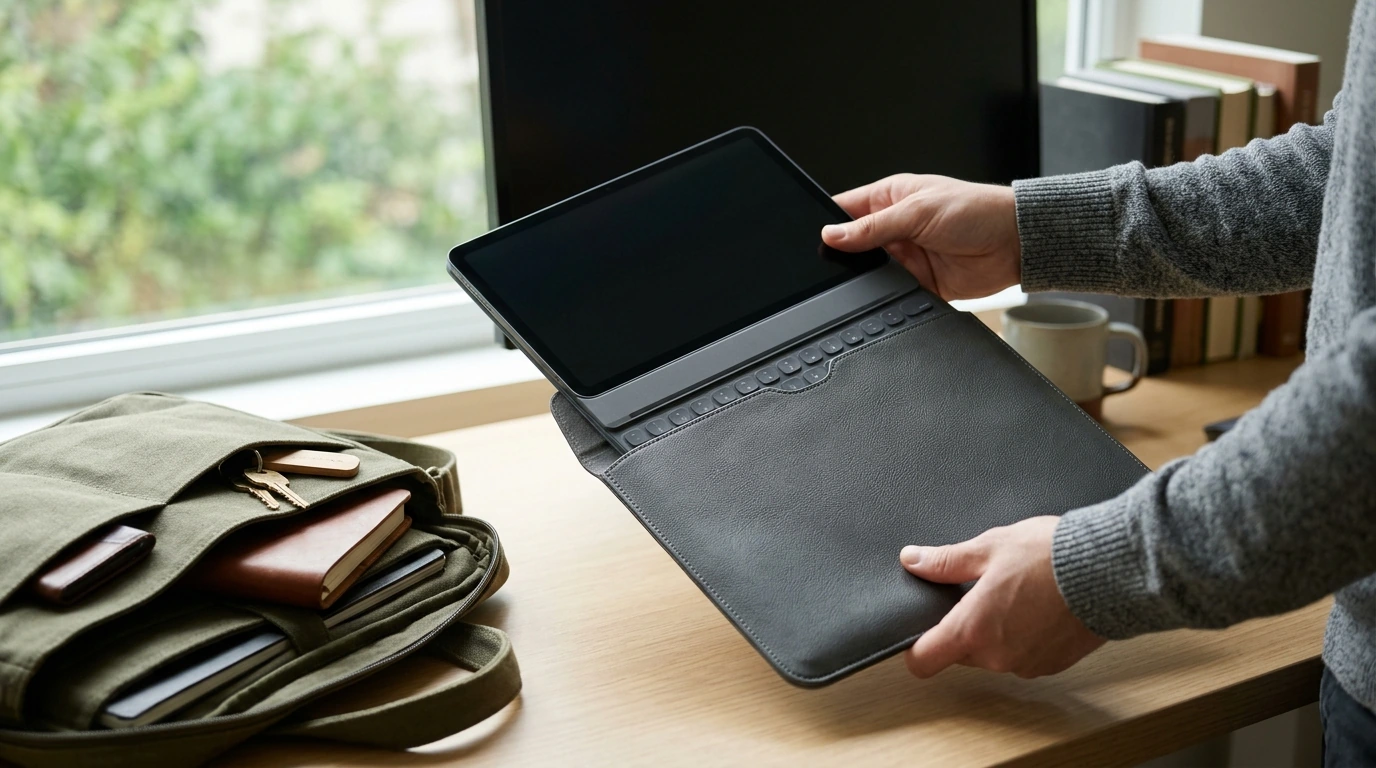
An iPad is easy to carry from room to room. Once it goes into a work bag, backpack, or carry-on, though, a dedicated place can make packing simpler. Our Shockproof PU Leather iPad Sleeve is an option for carrying or storing an iPad Pro, Air, or Mini. The decision starts with fit: the right sleeve size depends on your exact device and anything you leave attached to it.
Why Choose a Sleeve for Everyday Carry?
A sleeve gives your iPad its own space when it travels alongside notebooks, keys, and other bag contents. It also gives you one place to put the device between uses, whether you are clearing a desk or packing up at the end of the day. If you prefer a polished look, the PU leather exterior may suit the way you carry your other work essentials.
Think of a sleeve as a carrying and storage accessory, not an all-purpose safeguard. It does not remain on the iPad while you use it, as a fitted case does, and it does not turn the device into a hands-free workstation. If you want an integrated stand or an always-on screen cover, a different accessory may make more sense for your routine.
Start With Your Exact iPad Model
Our sleeve is listed for iPad Pro, Air, and Mini models in a stated 7.9-to-12.9-inch range. That range is a useful starting point, but screen size alone does not establish fit. Two iPads in the same family can have different physical dimensions. Before you choose a sleeve size, identify your exact model; Apple Support’s iPad model guide can help if you are unsure which one you have.
Next, compare your iPad’s height, width, and thickness with the dimensions for the size option you are considering. Take a moment to decide how you will actually store the device. A slim case, protective case, or attached keyboard changes the space it needs, even when the iPad’s screen size stays the same. Do not assume an attachment will fit inside the sleeve unless the selected size’s dimensions allow for the complete setup.
A Quick Fit-Check Before You Order
| Your setup | What to check | Why it matters |
|---|---|---|
| iPad without an attached case | Exact model and device dimensions | Models within the same family can differ in size. |
| iPad with a protective case | Combined width, height, and thickness | The case changes the space needed inside a sleeve. |
| iPad with a keyboard attachment | Whether the attachment stays on during storage | An attached keyboard can substantially change the overall fit. |
If your measurements fall close to a size limit, do not rely on the diagonal screen measurement to break the tie. Compare the full setup against the available sleeve dimensions, including thickness. A sleeve that is convenient to use should accommodate the way you carry your iPad, rather than require you to remove an attachment you planned to keep on.
Make It Part of Your Daily Routine
A sleeve can be useful at several points in the day. You might put your iPad away before a commute, keep it together with your other essentials in a shared workspace, or store it when you are finished using it at home. Those ordinary transitions are where a dedicated sleeve can help you keep track of the device without adding a permanent layer while you work.
Where you put the sleeved iPad matters, too. Choose a bag compartment where heavy items will not press against it. Avoid packing it beneath a loaded water bottle, a stack of books, or anything else that could put concentrated pressure on the device. The sleeve is described as shockproof, but no drop rating or tested impact standard is provided, so we would not treat it as a promise that an iPad will survive a fall.
Before leaving, make sure the iPad is fully inside the sleeve and that your bag has room for it without forcing it against other belongings. This quick habit is especially helpful if you switch between a work bag and a carry-on: you can use the same fit check each time instead of assuming every bag packs the same way.
Pair Your iPad With the Essentials You Actually Use
A sleeve handles carrying and storage; it does not replace your charging setup. If you often take your iPad between home, work, and travel, consider where you charge it and which cable and power adapter you already use. There is no need to add accessories solely because you are buying a sleeve.
If a separate wall adapter would be useful, our 65W GaN USB-C wall charger is another option to consider. Before purchasing a charger, confirm your iPad’s port and charging requirements, along with the cable you intend to use. Keeping that decision separate from sleeve sizing makes it easier to choose each item for its actual job.
Ready to give your iPad a dedicated place in your bag? Review the sleeve’s available size options, identify your exact model, and select the option that matches the dimensions of the device as you plan to carry it.
FAQ
Will this sleeve fit every iPad Pro, Air, and Mini?
Not necessarily. The listing names those iPad families and a 7.9-to-12.9-inch range, but fit depends on your exact model and the sleeve size you select.
Can I use the sleeve if my iPad already has a case?
Possibly. Compare the combined dimensions of your iPad and attached case with the dimensions of the sleeve size you want.
Is a sleeve the same as a protective iPad case?
No. A sleeve is for carrying or storing your iPad, while a fitted case stays on the device during use.
Recommended for you


A Smarter Spot for Your iPhone and AirPods Charger
Oct 21, 2026







Leave a comment